 All Case Studies








Glowral storefront at a glance
The main facts of the Glowral storefront build.
| Item | Detail |
|---|---|
| Client and industry | Glowral, D2C skincare |
| Customers | Online skincare shoppers in India, with mobile shopping as the priority |
| Catalogue | Four core products, two combos and an all-in-one kit |
| Our scope | Storefront design and build: theme, collections, product pages, offers and checkout set-up |
| Platform | Shopify; Dcrayon theme based on Yuva 5.0; Shiprocket checkout |
| Live period on record | November 2025 to January 2026 |
Challenge
Glowral launched with four core skincare products and needed its own online store to sell them. Dcrayon designed and built the Shopify storefront that carried the range.
The range covered sun protection, with an SPF 50 body spray and a water-based aqua gel sunscreen, and daily care, with a Korean-style face gel and a salicylic acid face wash. The brief asked for a clean catalogue that showed these products without clutter, was easy to browse and buy from on a phone, and kept checkout short. The theme's files date from early September 2025, and archived copies show the store live with products, prices, a cart and checkout from November 2025. The search and content work that followed the build is covered separately in the Glowral SEO and blog content case study.
What Glowral's four-product launch needed from its store
A small range had to look complete without looking padded.
Four products can make a store feel empty, and filling the gaps with banners or filler sections makes it feel cluttered instead. The store needed a structure that showed how the products work together, so that a shopper saw a routine rather than four unrelated items, and a way to sell more than one item without inventing new products.
The brief expected shoppers to browse and buy on their phones.
Mobile shopping came first in the brief. On a small screen every extra step or crowded section costs attention. Navigation, product cards, offers and checkout all had to be designed for a thumb first and a desktop second.
A new name had to give shoppers enough information to try it.
Glowral was not a brand most shoppers already knew. Before paying, buyers want to see the price and the saving clearly and understand what is in the product and how to use it. The store had to put that information on the product card and the product page, rather than on separate pages a shopper might never open.
Solution
Choosing a Dcrayon theme on Yuva 5.0 for a skincare launch
The store ran on a Dcrayon theme that our developers adapted from Yuva 5.0, a commercial Shopify theme by Omni Themes. Starting from an established theme gave the build a working set of sections, such as banner sliders, tabbed product grids, a cart drawer and collection pages, so the design effort went into Glowral's layout, content and offers rather than into rebuilding standard parts. Archived copies from December 2025 and January 2026 show the store running on Dcrayon's theme, first in a copy named for Fastrr, Shiprocket's checkout, and later in a development copy. Both names show the working pattern: changes were prepared in a copy of the live theme and published when ready. This is how we usually approach Shopify development for a young brand: adapt a sound base, then shape it around the range.
Routines, combos and gifting in a four-product catalogue
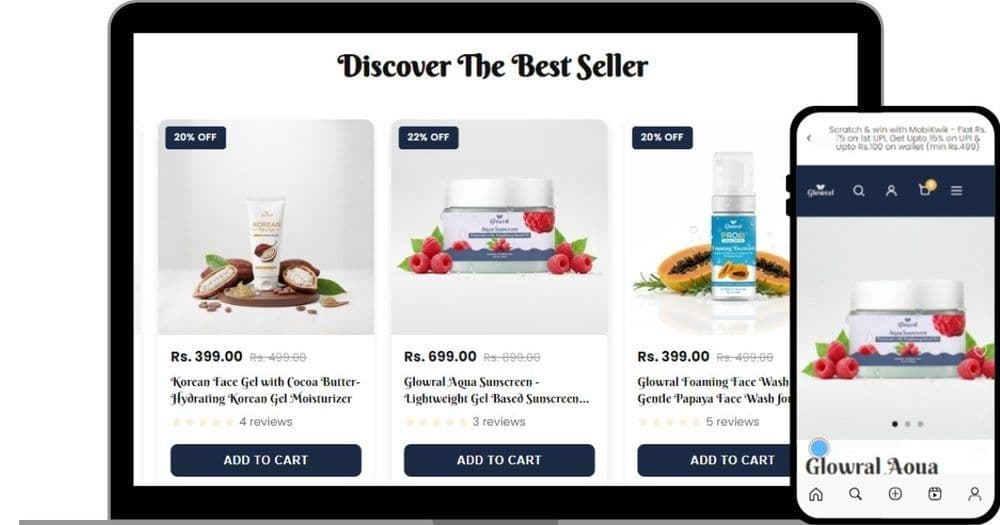
The catalogue was organised around how the products are used. Below the home page banners, a gallery carousel offered three entry points as image tiles: Gifting, Sun Defense Squad for the sun protection products, and Daily Glow Essentials for the cleanse and hydrate products. A tabbed collection section underneath showed the best sellers, with tabs to switch between product groups.
Alongside the four single products, the store sold a Daily Glow Combo (the face wash with the Korean gel), a Sun Protection Combo (the aqua gel sunscreen with the SPF 50 body spray) and an All in One Skincare Kit, each as an ordinary product with its own page and price. A shopper who arrived for one product could see the routine it belongs to and buy it in one step, and a range of four read as a planned set of seven.
Offers shown before the cart
The announcement bar at the top of the store rotated the current offers: a first-order code with a countdown timer, a scratch-and-win offer from a wallet partner on the first UPI payment, and a discount on prepaid orders with free shipping above a threshold. On product pages, a scrolling text strip ran the current multi-buy offer, for example two face washes, two gels or one of each at a fixed price. That strip reads its text from a metafield (an extra data field that Shopify stores alongside products and the shop), so the offer can be changed without editing the theme.
A slide-out offer panel held a coupon tab and a list of similar products, so a shopper could look for a code without leaving the page they were on. The UI and UX design work gave each offer a fixed place, the bar, the strip and the panel, so shoppers met the same offers in the same places on every page.
Skincare product pages built from sections and metafields
Each product page was assembled from the same set of sections. The main product section held an image gallery with zoom and a swipeable slider, the product title, the sale price beside the struck-through regular price, a percentage-off badge and the variant picker. Below it, an FAQ section showed five questions in an accordion, so each answer opens only when tapped and the page stays short on a phone. The questions and answers live in product metafields, so each product has its own FAQ through one shared section. A product recommendations section closed the page.
Inside the description, the product copy was broken into short headed sections, from the reasons to choose it and its specifications to usage directions, cautions and who makes and markets it. The store also used a shoppable video app, which places short product videos on the store with a direct link to buy.
Search groundwork laid in the theme
The theme gave every page a canonical tag pointing at its own address, a title and meta description set per page, and schema markup, machine-readable labels for what each page sells. Product pages carried FAQPage data for their five questions, the face wash page carried Product data with brand, SKU, price, availability and its 100 ml pack size, and the brand's organisation record pointed to its Instagram account. Tracking was built into the theme as well: a tag manager container carrying Google Analytics 4, Microsoft Clarity's behaviour recording and the Meta pixel. The later search programme built on these foundations.
Checkout and platform security for Glowral shoppers
Shopify hosted glowral.com, so server patching, the TLS certificate and the payment security of the checkout sat with the platform. The theme handed checkout to Shiprocket, so card and UPI details went to the checkout provider and never through Glowral's theme code. The Internet Archive keeps the original response headers of each copy it saves, and those for 25 January 2026 show HSTS (HTTP Strict Transport Security) set to 7,889,238 seconds, X-Frame-Options at DENY with a matching frame-ancestors policy against clickjacking, a policy that upgrades any insecure request and blocks mixed content, and nosniff on content types. The video and section apps were installed through Shopify's app system as app blocks, not as code pasted into the theme.
Glowral theme parts, from small components to page templates
The building blocks of the Glowral theme, smallest first.
| Component level | Examples from this build | Used on |
|---|---|---|
| Small components | Image zoom, swipeable product slider, accordion, tabs, percent-off badge, compare-at price | Product cards and product pages |
| Metafield content | Product FAQ questions and answers; multi-buy offer text | Product pages |
| Sections | Banner slider, gallery carousel, tabbed collections, expandable read-more, scrolling offer strip, FAQ, recommendations | Home and product pages |
| Store-wide sections | Announcement bar, header, footer, slide-out offer panel | Every page |
| Templates | Home page and product page templates assembled from the sections above | Whole store |
Platform and checkout controls on glowral.com
The security controls protecting Glowral shoppers and how each one was checked.
| Control | Where it applies | How it was checked |
|---|---|---|
| HSTS policy of 7,889,238 seconds | Every page | Archived response header, 25 Jan 2026 |
| No framing by other sites (X-Frame-Options and frame-ancestors) | Every page | Archived response headers |
| Mixed content blocked and upgraded to HTTPS | Every page | Archived content security policy header |
| Card and UPI details kept on the hosted checkout | Checkout | Shiprocket checkout scripts in archived page code |
| Apps added through Shopify's app system | Home and product pages | App blocks in archived page code |
Dcrayon services on the Glowral launch
The services behind the build and what each one contributed.
| Service | What it contributed |
|---|---|
| Shopify development | Theme build on Yuva 5.0, sections, FAQs and offers stored in metafields, checkout set-up |
| UI and UX design | Mobile-first layout for product cards, offers, the offer panel and the cart |
| E-commerce solutions | Catalogue structure with routines, combos, a kit and gifting |
Results
What Glowral's shoppers and team got at launch
Glowral's customers could browse the full range on a phone, start from a routine or a gift, see the price and saving on every card, find an offer code without leaving the page, and buy either a single product or a ready-made routine through Shiprocket's checkout. Product pages answered the common questions in place, with ingredients, usage and label details on the same page.
The Glowral team had a store structure that new products could slot into: collections by routine, combos sold as ordinary products, offers and FAQs held in metafields so they can be changed without touching code, and a blog section already in place for the content programme that followed. Archived copies show the store live with prices, a cart and checkout between November 2025 and January 2026.
Key takeaways
What the launch says about small skincare ranges
A small range is easier to buy from when the store shows how the products fit together. Grouping four products into two routines, two combos and a kit gave shoppers a simple way to buy more than one item, without adding a single new product.
Offers belong where the shopper already is. An announcement bar, a scrolling strip on the product page and a slide-out coupon panel each put the deal in front of a mobile shopper without a separate offers page, and keeping that text in metafields means the next offer is an edit, not a theme change.
If you are weighing up the smaller changes that make a Shopify store easier to buy from, our six Shopify CRO wins go through them one by one, and our piece on why a custom ecommerce website needs an agency covers when a build like this is worth it. The search work that followed this build is in the Glowral SEO and blog content case study. If you are launching a skincare or beauty range and need a store built around it, start a conversation with us.
CategoryWeb Development
More work