 All Case Studies









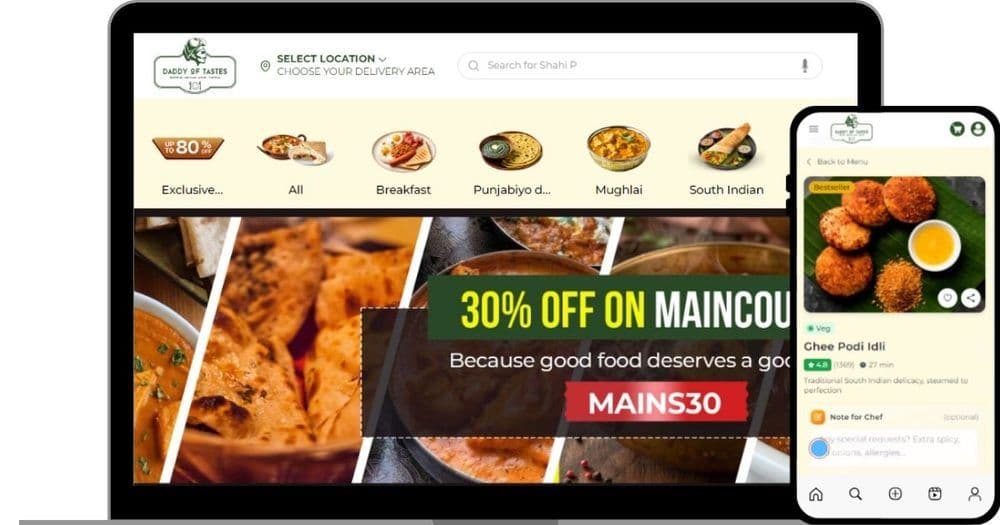
Daddy of Tastes platform at a glance
The main facts of the Daddy of Tastes ordering platform.
| Item | Detail |
|---|---|
| Client and industry | Daddy of Tastes, multi-cuisine restaurant group |
| Market and audience | Gurugram, India; customers ordering food for delivery |
| Engagement period | Dec 2025 to Jul 2026, from project documentation and commit history |
| Our scope | Customer store, kitchen board, rider app and admin panel on one codebase |
| Platform and stack | Laravel 11, Vue 3, Inertia, Pinia, Laravel Reverb, MySQL 8, Razorpay, Amazon SQS, AWS hosting |
Challenge
Daddy of Tastes runs restaurant kitchens across Gurugram. Dcrayon built it a direct online ordering platform: a customer store, a kitchen board and a rider app on one Laravel codebase.
Gurugram kitchens that sold mainly through aggregators
The group's outlets already sold through food delivery aggregators. Its menu is large and multi-cuisine: momos, rolls, thalis, biryani and rice, Indo-Chinese, pizza, ramen, kulcha and breads, starters, combos, drinks and desserts, cooked at more than one location. A direct channel meant taking on the jobs an aggregator normally does: showing the menu and stock of each kitchen, taking payment, deciding who can be delivered to, finding a rider and proving that the food reached the right person.
Four kitchens, one menu, separate stock
A dish that has sold out at one kitchen may still be available at another. The menu spreadsheet held 94 items with 376 stock records across four locations, including the Sector 29 and Golf Course Road outlets. Stock therefore had to be tracked per kitchen and reset each day, and the store had to stop a customer paying for a dish that had just run out.
Kitchens that need to notice every order
In a busy kitchen, a new order that nobody notices is a lost customer. Staff needed an alert that could not be missed, that kept ringing until someone took responsibility for the order, and that did not merge several orders into one sound during a rush.
Riders who must be found fast and fairly
Without an aggregator's fleet, every order needs a rider from the group's own pool. An order offered to one rider who ignores it cannot be left waiting, two riders must not both accept the same order, and a rider who is already carrying food should be able to take another order on the same route.
Delivery areas that depend on each kitchen
Each kitchen can deliver only within a certain distance. Customers needed a reliable way to mark exactly where they are, and the system had to accept addresses near an outlet without wrongly turning them away.
Proof that the right person received the food
On its own channel the restaurant, not an aggregator, has to settle any dispute about a delivery. The handover needed a check the customer takes part in, and a record the restaurant can show later.
The three Daddy of Tastes apps and what each does
How the customer, kitchen and rider apps share one order.
| Application part | What it does in this project |
|---|---|
| Customer app | Menu, cart, checkout with address pin, Razorpay or cash, order tracking with a live rider map, account, wallet, loyalty and referrals |
| Kitchen app | Four-column board (pending, confirmed, preparing, ready), per-order bell until acknowledged, packing photo before ready |
| Rider app | Offers with a 60-second window, pickup and arrival steps, delivery OTP, delivery photo and earnings |
| Admin panel | Menu, outlet stock, delivery zones, riders, offers, banners, loyalty, surveys and reports, with activity and export logs |
| Background jobs | Store alert and rider assignment on an SQS FIFO queue; sweeps for expired offers and unassigned orders |
Solution
Three apps that pass one order between them
The platform is one Laravel 11 application that serves three installable web apps, PWAs (progressive web apps that install from the browser like a phone app), each with its own manifest: one for customers, one for the kitchen and one for riders. An order moves through a single status field with eight values: scheduled, pending, confirmed, preparing, ready, outfordelivery, delivered and cancelled. Every change is written to an order status history table, so the restaurant can trace each order's progress.
A customer places the order through the checkout page. The order is created as pending (or scheduled, for later delivery), and two background jobs are sent at once: one that tells the outlet about the new order and one that starts looking for a rider. On the kitchen board, staff acknowledge the order, which silences its alert, and move it forward one step at a time: confirmed, preparing, then ready. Moving an order from preparing to ready requires a kitchen photo of the order. Meanwhile the rider app shows the rider an offer; once accepted, the rider marks arrival at the outlet, picks up the order (which sets it to outfordelivery), marks arrival at the customer, verifies the delivery OTP and uploads a delivery photo, and only then can the order be marked delivered. The customer follows these steps on an order tracking page with a live map of the rider's position.
This kind of multi-app build sits in our custom web application service.
A kitchen board with a bell that cannot be missed
The kitchen app is a single display page with four columns: pending, confirmed, preparing and ready. It checks for new orders every three seconds. An order rings while it is still pending and nobody has acknowledged it. A bell queue plays one bell per order, back to back, so three orders arriving together produce three distinct alerts rather than one. After that, a reminder alarm repeats until a member of staff acknowledges the order, with a Web Audio fallback for browsers that block autoplay. Fixes made in July 2026 kept the newest order on top during a rush, broke ordering ties in the admin alert as well as on the kitchen board, and paced the bell queue on a steady beat so alerts do not run together. The admin panel has its own alarm for the same events.
Rider offers, re-offers and several orders per rider
Rider matching lives in one class, DriverAssignmentService, with its rules set as named constants. An offer goes to riders within four kilometres of the outlet, or to the whole active pool if nobody is in range, and each offer is open for 60 seconds. A sweep runs every ten seconds to expire stale offers, and another runs every minute to re-offer any order that is still unassigned, for up to 15 rounds and three hours, with a five-minute cooldown between re-offers. A rider who rejects an order is not offered it again for 30 minutes. When a rider accepts, the record is locked for the update, so if two riders tap accept at the same moment only one of them gets the order. Each rider can hold up to three active orders by default, a limit the restaurant can change in settings, and the system checks the rider's current workload before making an offer.
The two jobs that start this process, AssignDriverToOrder and NotifyStoreOfNewOrder, run on an Amazon SQS FIFO queue (a managed first-in, first-out message queue on AWS), grouped per job type and order, with three attempts each and a fallback to the standard queue if SQS is unavailable. Rider positions and in-app notifications reach screens through Laravel Reverb, a websocket server, on a private channel for each user.
Menu, stock and prices calculated on the server
A spreadsheet importer, MenuInventoryImporter, loaded the menu and stock from the restaurant's own workbook. Stock is held per outlet in a menu item locations table, which carries each outlet's price, stock quantity, daily limit and stock status; an empty quantity means unlimited. A scheduled command resets daily stock at midnight, a stock monitor sends low-stock alerts at 6 pm and runs again at 8 am, and the cart checks stock again before checkout.
Prices are never taken from the browser. When an order is created, OrderService works out each line from the database: the variant price if there is one, otherwise the outlet's price, otherwise the base price, with add-ons priced from the database or the outlet's override. The browser's subtotal and total are ignored. Quantities are limited to between 1 and 20 per line, phone numbers to ten digits and pincodes to six, and the stock rows for the order are locked while it is created, so two customers cannot both buy the last portion. Coupons are checked for outlet, first-order rules, minimum order value, per-customer limit and total usage under the same lock.
Checkout, Razorpay and delivery zones
At checkout the customer searches an address with Google Places Autocomplete, restricted to India, and then drags a pin on a map to the exact spot, for themselves or for someone else; a fallback geocoder covers lookups when Google is unavailable. The platform then asks whether that point can be served. Distance is calculated with the haversine formula (straight-line distance on the earth's surface) from the outlet. There is a platform-wide cap of eight kilometres, and each outlet's own delivery zones can only tighten it, never extend it. A July 2026 fix made sure customers inside an outlet's maximum radius are accepted even if they sit in a gap between zones.
Payment runs through Razorpay. The amount sent to Razorpay is always the server's total for the order, converted to paise at that boundary, and the order's owner is checked first. When the customer returns, the payment signature is verified with HMAC-SHA256 using a constant-time comparison, and the platform asks Razorpay for the payment again and checks that the amount matches what it expected. Razorpay's webhook, a server-to-server message, is verified against the raw request body, and the handlers for captured, failed and refunded payments skip orders that are already paid. Cash orders stay pending until delivery, and wallet payments are deducted inside the same database transaction as the order. Our API development work covers payment and mapping integrations of this kind.
OTP and photo proof at the door
The delivery OTP is created the first time the rider taps deliver, sent to the customer by in-app notification and email, and expires after ten minutes, when a new one is issued. Riders never see the code; the customer reads it out. Wrong attempts are limited, and so is the number of tries per minute. A delivery photo is also required: photos must be JPEG, PNG or WebP images, and a July 2026 fix compresses phone photos before upload so that large images are no longer rejected. An order can only be marked delivered once the OTP is verified and a delivery photo exists, which gives the restaurant two separate records for every handover.
Accounts, rewards and support on the customer app
Customers can sign in with Google and keep addresses, a wishlist, a wallet, gift cards, loyalty points across tiers and referral links. An abandoned-cart job runs every 30 minutes and sends reminder emails, scheduled orders are released every five minutes, stale orders are closed hourly, and customer surveys feed back into the admin panel. Web Push notifications reach customers, kitchen staff and riders through the browser, and mail classes cover the order journey, from confirmation and rider assignment to the delivery OTP and the delivered message, alongside low-stock, abandoned-cart and contact emails.
A support assistant that only sees the customer's own orders
A support chat assistant answers customer questions on the site. It runs on Anthropic's Claude model, moved from OpenAI in July 2026. Its context is limited to what a support agent would need for that customer: their name, their five most recent orders with status, total, items and estimated time, the last 20 messages of the conversation and the restaurant's support contact. It is told to stay on orders, cancellations and refunds, the menu and allergens, delivery, loyalty, wallet and offers, never to invent order details, to ask for an order number when it does not know one and to hand disputes to the support contact. Replies are kept to two to four sentences, and the chat endpoint is rate-limited.
How the code is organised
The back end is Laravel 11 on PHP 8.3 in production, with MySQL 8, Laravel Sanctum for API tokens and Socialite for Google sign-in. The front end is Vue 3 with Pinia stores, connected to Laravel through Inertia, a library that lets Laravel serve Vue pages directly without a separate API for every screen, and built with Vite and Tailwind CSS. Business rules live in service classes rather than controllers: OrderService for order creation and cancellation, DriverAssignmentService for rider offers, InventoryService for stock, CustomerOrderNotificationService for order messages, LoyaltyService, WalletService and GiftCardService for rewards, and ScheduledOrderService for orders placed in advance. Money is stored as decimal rupee amounts, and event times are named for the event, such as assignedat, pickedupat and storeacknowledged_at.
The Vue components are grouped from small to large. A ui folder holds buttons, inputs, selects, badges, cards, skeleton loaders, toasts, dialogs and the sticky checkout bar. A food folder holds the quantity selector, food cards, the add-ons modal, food carousels and grids. Location components hold the Google Places input, the address pin map and a location detector. Larger pieces include the live order map, homepage sections, the notification centre and the support chat widget, and layout components wrap the customer app and the admin panel. Ten Pinia stores hold shared state, including the cart, address, delivery zone, location, wallet, wishlist and a dietary filter.
Access by role in the kitchen, rider and admin apps
Each app has its own gate. Kitchen routes sit behind middleware that admits staff only. Rider routes require an active, verified rider, and every rider action checks that the order belongs to that rider; a rider can view an order they do not hold only while they have a live offer for it. Customers can see only their own orders, or, for guest checkout, orders placed in the same session. The admin panel sits behind a group of middleware that authenticates the admin, applies session security, logs admin activity and every export, and checks a per-module permission for orders, menu, content and the other sections.
The live domain sends a set of browser security headers, checked with a header request on 13 Oct 2026: HSTS (which tells browsers to use HTTPS only) with subdomains, frame blocking, content-type protection, a strict referrer policy, a content security policy that upgrades insecure requests, and a permissions policy that turns off the camera and keeps microphone, location and payment features to the site itself.
Search pages that work before the store opens
The platform generates a sitemap covering the static pages, the AMP pages and every menu item page. AMP pages (a lightweight page format that loads quickly on mobile) exist for the home, menu, menu items, offers, about, contact and FAQ pages. On 13 Oct 2026 the public AMP home page published structured data for the restaurant, its menu, its opening hours, its postal address and the website's search, and the AMP FAQ page published FAQPage markup with ten questions and answers. The menu can be filtered on AMP by 22 categories. The robots file keeps the account, cart, checkout, kitchen, rider and admin areas out of search. Our technical SEO service covers this layer, and GA4, Google Tag Manager and the Meta Pixel are built in, with a server-side conversion service for Meta.
Audit, fixes and the July 2026 server move
Before the platform moved to a new server in July 2026, a code audit logged 135 findings across payment integrity, coupons, stock, account access, the order lifecycle, rider flows, content management and admin validation. The fixes went in on 3 Jul 2026 as one change touching 73 files, including the payment, order, kitchen and rider controllers, the order service, the rider assignment service and four new database migrations. Live hotfixes made on the old server were then brought back into Git, order-visibility fixes for the kitchen and rider screens were built on a separate branch and merged through a pull request, and each release bumps the service worker version so that installed kitchen and rider apps load the new code. Hosting on AWS in the Mumbai region falls under our AWS services.
Order data behind Daddy of Tastes
The main tables that carry an order from menu to doorstep, with their real names.
| Entity | Table or file | What it holds |
|---|---|---|
| Order | orders | Totals in decimal rupees, payment state, status, rider and OTP fields |
| Order history | order_status_history | Every status change on an order |
| Rider offer | order_offers | Offers sent to riders, with expiry, distance and outcome |
| Proof photo | order_preparation_photos | Kitchen packing photos and delivery photos |
| Outlet stock | menu_item_locations | Price, stock quantity, daily limit and stock status per outlet |
| Delivery zone | delivery_zones | Minimum and maximum radius, fee and minimum order per outlet |
Daddy of Tastes order and payment controls
Where the platform protects money, stock and deliveries, and how each control was checked.
| Control | Where it applies | How it was checked |
|---|---|---|
| Server-side pricing; browser totals ignored | Order creation | Code inspection of OrderService |
| Stock rows locked during order creation | Checkout | Code inspection of OrderService |
| Razorpay signature and amount re-check | Payment verify and webhook | Code inspection of PaymentController |
| Rider and customer see only their own orders | Rider app and customer account | Code inspection of rider and account controllers |
| OTP plus delivery photo required to close | Rider app | Code inspection of DeliveryController |
| HSTS, frame blocking, content-type protection | Every response | Header request on 13 Oct 2026 |
Results
What the Daddy of Tastes kitchens and riders work with
Customers can order from the full menu, pin their exact location, pay through Razorpay or on delivery, schedule an order and follow the rider on a live map. Kitchen staff hear one bell per new order until someone acknowledges it, and move each order through a four-column board with a photo at the packing step. Riders receive offers automatically, can carry up to three orders at once and close each delivery with the customer's OTP and a photo. The restaurant team manages menus, stock by outlet, delivery zones, riders, offers, banners, loyalty and surveys from one admin panel, with every admin action and export logged.
At the time of writing, the public domain shows a launch page while the AMP menu pages are already public. Order and revenue figures are not published.
What changed in the Daddy of Tastes kitchens
What the platform delivers for customers, kitchen staff and riders.
| Outcome | What changed | Status |
|---|---|---|
| Every order noticed | One bell per order until a member of staff acknowledges it | Delivered |
| No order left waiting | Re-offers every minute for up to three hours; up to three orders per rider | Delivered |
| Exact delivery location | Address search plus drag-to-pin map and haversine zone check | Delivered |
| Two records per handover | Delivery OTP and delivery photo | Delivered |
| Public ordering | Launch page on the main domain; AMP menu pages public | In progress |
Key takeaways
What a direct food ordering channel really involves
A direct ordering channel is three products, not one: a store for customers, a board for the kitchen and an app for riders. Building them on one codebase meant one order record moves through every screen, and the hard parts lived in the rules between them: who may move an order to the next status, what happens when an offer expires, when a rider has room for another order, and what counts as proof of delivery. Writing those rules as named constants and service classes, rather than scattering them across screens, is what let the July 2026 rush fixes land in one place each.
Prices, stock and payment amounts belong on the server. The browser shows the menu and collects choices; the platform decides what each line costs, whether the stock exists and what Razorpay must confirm. For how the largest aggregator built its lead, read how Zomato won food delivery. Our article on how automated chatbots turn leads into customers covers assistants like the one on this platform, and the Foreverkids case study shows another Laravel build that joins online orders with in-store operations.
If you run a restaurant group and want your own ordering channel alongside the aggregators, talk to our team.
CategoryWeb Development
More work